Our latest releases brings support for vendor credits to Invoice AI, a major shift in how vendors are onboarded for ACH, a brand-new AI assistant on the Charted homepage, smoother workflows in split-screen, and no more limits on queued check batches—all without leaving NetSuite.
Invoice AI: Vendor credits now supported
One of our most-requested features has landed: Invoice AI now supports vendor credits alongside vendor bills. Credits can flow through the same AI-powered inbox your team already uses for bills, giving you a single place to review every incoming document regardless of type.
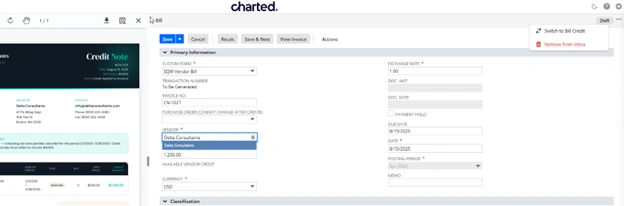
For a step-by-step walkthrough, see How do I process vendor credits with Invoice AI in our documentation.
Payment Automation: ACH onboarding becomes opt-out, not opt-in
Vendors previously had to actively opt in (via email) to receive ACH payments, which created friction and left many vendors on paper checks by default.
Now, Payment Automation flips the model: vendors are given a 10 business day window to opt out after receiving the payee invitation email. If they don’t respond, they are automatically eligible to be paid via ACH using the payment information you already have on file. The result is more vendors on ACH, faster, with less back-and-forth from your AP team.
Meet the Charted Clerk
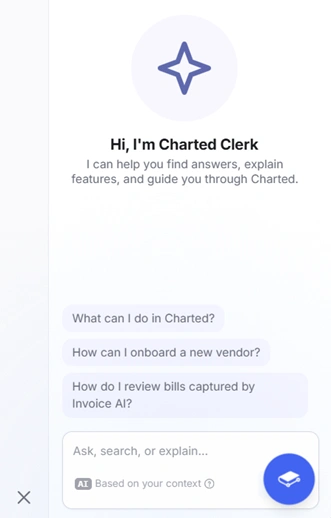
Say hello to the Charted Clerk, a new AI assistant available within the Charted SuiteApp and Charted product documentation. To get help from the Charted Clerk, click the blue icon in the bottom right-hand corner of the Charted app in NetSuite, or click on the Ask button beside the search bar at the top of the product documentation page. Clerk can help you find answers, surface relevant documentation, explain features, and guide you through Charted workflows, all sourced from official Charted documentation.
Invoice AI: A new context bar in split-screen view
When reviewing documents scanned via Invoice AI, you will now see a new context bar at the top, showing the transaction type and document number of the bill or credit you’re reviewing. No more second-guessing what you’re looking at or its approval status.
The context bar also gives you a quick way to remove a document from the inbox while you’re reviewing it—no more jumping back to the inbox to remove the document.
Check Printing: No more limits on queued batches
The previous cap of six ready-to-print check batches is gone for customers using Charted Check Printing. Teams can now queue up as many check batches as they want and print the PDFs whenever they’re ready—a meaningful unlock for companies running high check volume or staggered print schedules
To update or streamline your AP operations with the latest from Charted, schedule a consultation with our team of NetSuite and AP Automation experts.