
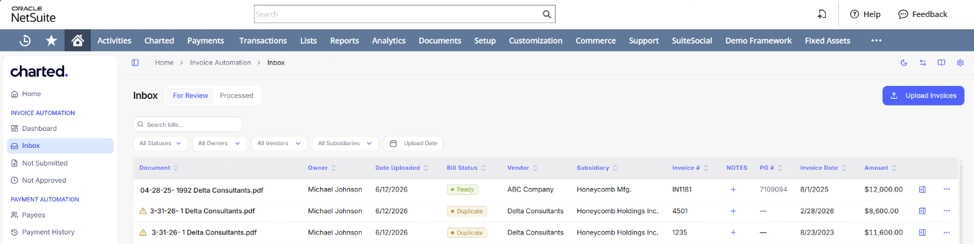
Charted has a fresh new look. We’ve redesigned the Charted interface embedded inside NetSuite to be cleaner, more intuitive, and more focused on the work you came to do. Starting today, every user can opt in whenever they’re ready.
A redesigned interface, built around how you work
The new interface brings a more modern, streamlined experience across the app, with improvements driven directly by customer feedback:
- Refreshed experience. A cleaner, more intuitive navigation experience throughout the app, so the tools you use most are easier to find.
- Improved page filters. Active filters are now listed at the top of each page for better visibility, a frequently requested improvement.
- More screen real estate. The redesigned layout keeps you focused on the task at hand, with less scrolling and more of what matters on screen.
Trying the new look
The new interface is opt-in and user-specific, so each member of your team can switch whenever they’re ready. There are no account-wide changes and no disruption to anyone’s workflow. To make the switch, click the blue Try the new Charted look button in the upper right corner of the app. Prefer the classic view? You can switch back at any time.

For step-by-step instructions, FAQs, and details on switching back, see our guide: Trying the new Charted interface.
Just the beginning
The redesigned interface also lays the groundwork for several features we’ll be rolling out in the coming months, including some major improvements to Invoice AI and Vendor Onboarding we think your team will really appreciate. Stay tuned.
Have questions about the new interface? Schedule a consultation with our team of NetSuite and AP automation experts—we’re happy to walk through what to expect.